
What is the C4 Model? Complete Guide to Architecture Diagrams (2026)
What is the C4 Model?
The C4 model is a lightweight, hierarchical framework for visualizing and communicating software architecture. Created by software architect Simon Brown in the early 2010s, it provides a structured way to describe the static structure of a software system at four different levels of detail. The name "C4" stands for the four core diagram types: Context, Container, Component, and Code.
Simon Brown developed the C4 model as a pragmatic alternative to the complexity of UML (Unified Modeling Language). His goal was simple: give developers and architects a small set of abstractions and diagram types that are easy to learn, easy to draw, and easy to explain to both technical and non-technical stakeholders. Unlike UML, which requires extensive training to read and write correctly, the C4 model is intuitive enough that a developer can create a meaningful diagram in under an hour and present it to a business executive without needing a translation layer.
At its core, the C4 model is about maps for code. Just as a city map can be viewed at different zoom levels — country, region, city, street — C4 diagrams let you zoom in and out of a software system. You start with a high-level context view showing how the system fits into the world, then progressively drill down into containers, components, and finally individual code elements. This hierarchical zoom is what makes C4 uniquely powerful for documentation that serves multiple audiences.
The 4 Levels of the C4 Model
Each level of the C4 model serves a distinct purpose and targets a specific audience. Here is a quick overview before we go deeper:
| Level | Diagram Type | Audience | Key Question | |-------|-------------|----------|--------------| | 1 | System Context | Everyone | What does the system do and who uses it? | | 2 | Container | Developers, architects | What are the high-level technical building blocks? | | 3 | Component | Developers | What are the major components inside each container? | | 4 | Code | Developers | How is a component implemented? |
For a detailed breakdown of each level with real examples, see the C4 Model Levels Explained guide.
Level 1: System Context Diagram
The System Context diagram is the highest-level view in the C4 model. It shows your software system as a single box in the center, surrounded by the people (users, personas) and other software systems it interacts with. No technical details appear here — only the relationships and dependencies at a conceptual level.
This diagram answers the question: "What is this system, who uses it, and what does it depend on?"
The System Context diagram is invaluable in kickoff meetings, onboarding sessions, and stakeholder presentations. Everyone in the room — from the CEO to the junior developer — can understand it without any special knowledge. It sets the scene before you zoom in.
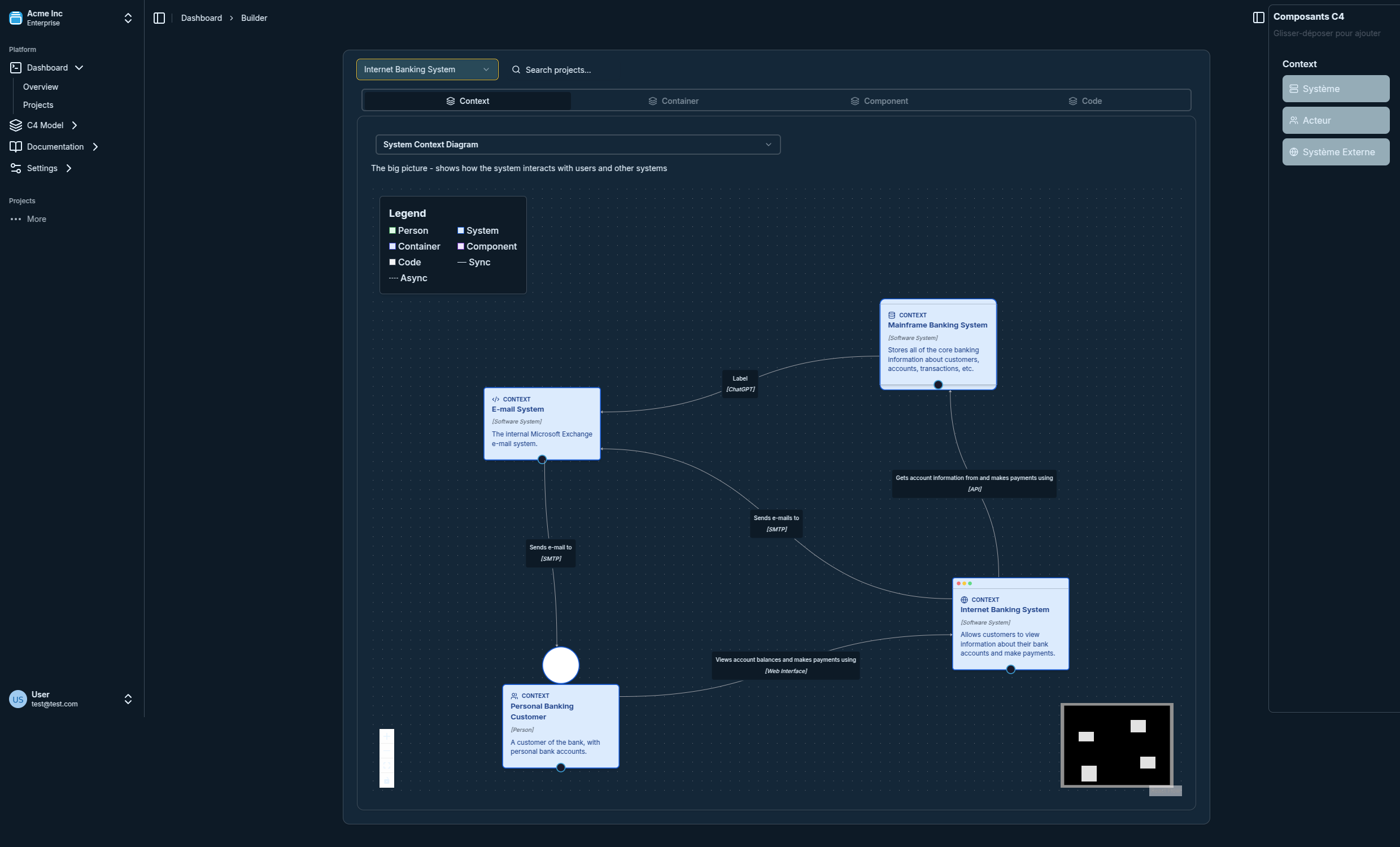
For a complete walkthrough of this diagram type, read the C4 Context Diagram Guide.
Level 2: Container Diagram
A "container" in C4 terminology is not a Docker container. It refers to any separately runnable or deployable unit: a web application, a mobile app, a database, a message queue, a serverless function, or a microservice. The Container diagram zooms into your system and shows these high-level technical building blocks, how they communicate, and what technologies they use.
This diagram answers: "What are the major technical components that make up this system, and how do they talk to each other?"
Container diagrams are the workhorses of C4. They are the most commonly referenced diagram type for day-to-day architecture conversations, sprint planning, and onboarding new engineers. A well-maintained Container diagram can replace hours of tribal knowledge transfer.
Level 3: Component Diagram
The Component diagram zooms into a single container and shows its internal structure — the major logical components, their responsibilities, and how they interact. In practice, a "component" often maps to a module, a service class, a controller, or a domain aggregate in your codebase.
This diagram answers: "How is this container structured internally?"
Component diagrams are most useful when onboarding developers to a specific service, conducting architecture reviews, or planning a major refactoring. They bridge the gap between the high-level Container view and the actual code. For best practices on drawing these, see C4 Component Diagram Best Practices.
Level 4: Code Diagram (Optional)
The Code level is optional and rarely used in practice. It maps directly to UML class diagrams or entity-relationship diagrams, showing how individual classes, interfaces, and data models are structured within a component. Simon Brown himself recommends against maintaining these diagrams manually because they become outdated almost immediately as code evolves.
The Code level is best suited for documenting a particularly complex algorithm, a critical domain model, or a public API contract — situations where the code-level structure is genuinely difficult to understand from the source alone.
Why Use the C4 Model?
If your team is already familiar with UML or whiteboard diagrams, you might wonder why you should switch to C4. Here are the key advantages that have made C4 one of the most widely adopted architecture documentation frameworks in modern software development.
Simple to Learn, Simple to Read
The C4 model has exactly four diagram types and a small vocabulary of abstractions: Person, Software System, Container, Component, and Relationship. That is the entire model. A developer can learn it in 30 minutes and produce useful diagrams immediately. Compare this to UML, which has 14 diagram types and hundreds of notation elements that take months to master.
Works for All Audiences
One of C4's most underappreciated strengths is that different diagram levels speak to different audiences without requiring separate documentation tracks. The System Context diagram works in a boardroom. The Container diagram works in a sprint review. The Component diagram works in a code review. One framework, multiple communication layers.
Scalable Zoom
The hierarchical nature of C4 means you can always answer two questions: "where does this fit in the bigger picture?" and "what is inside this?". This prevents the common problem of monolithic architecture diagrams that are either too abstract to be useful or too detailed to be readable. With C4, you pick the right zoom level for the conversation at hand.
Tool-Agnostic and Text-Friendly
The C4 model is a set of abstractions, not a proprietary tool format. You can draw C4 diagrams with any diagramming tool. More importantly, C4 is well-suited to diagrams-as-code approaches using tools like Structurizr DSL, PlantUML, or Mermaid, which means your architecture documentation can live in version control alongside your source code.
Encourages Architecture Conversations
Because C4 diagrams are quick to create and easy to revise, teams actually keep them up to date. This is in stark contrast to elaborate UML models that are lovingly crafted once and then never touched again. C4's low friction encourages a culture of living documentation.
C4 Model vs UML
The C4 model and UML are not enemies. Simon Brown himself frames C4 as a way to think about and communicate architecture, whereas UML is a notation standard. In practice, you can use UML notation inside C4 diagrams if your team prefers it.
That said, in most practical scenarios, C4 is the better default choice for modern software teams:
- C4 is better when you need to communicate across technical and non-technical audiences, want lightweight documentation, or are working in an agile environment where architecture evolves frequently.
- UML is better when you need precise, standardized notation for complex behavioral modeling (sequence diagrams, state machines), formal specification, or tooling that consumes UML as input.
The most common mistake teams make is using UML class diagrams to document system architecture at a high level. This produces diagrams that are technically precise but practically unreadable for anyone outside the team that drew them. C4's Context and Container diagrams fill this gap far more effectively.
For a detailed side-by-side comparison including when each approach shines, read C4 Model vs UML.
How to Create Your First C4 Diagram
Creating your first C4 diagram is straightforward. Here is a step-by-step process to get from zero to a useful System Context diagram in under 30 minutes.
Step 1: Identify the system you are documenting. Pick a single software system you know well. Write down its name and its primary purpose in one sentence.
Step 2: List the users. Who are the humans that interact with this system directly? Give each one a name and a short description of their role. These are your "Person" elements.
Step 3: List the external systems. What other software systems does your system depend on or talk to? Payment processors, email providers, authentication services, third-party APIs — list them all. These are your "Software System" elements.
Step 4: Draw the relationships. For each person and external system, draw a labeled arrow describing the interaction. Use plain language: "submits orders via", "receives notifications from", "authenticates users using".
Step 5: Review for completeness. Ask yourself: if a new engineer joined the team tomorrow and saw only this diagram, would they understand what the system does and how it connects to the outside world? If yes, you are done with Level 1.
Step 6: Zoom in with a Container diagram. Repeat the process for the internals of your system: list the deployable units, their technologies, and how they communicate.
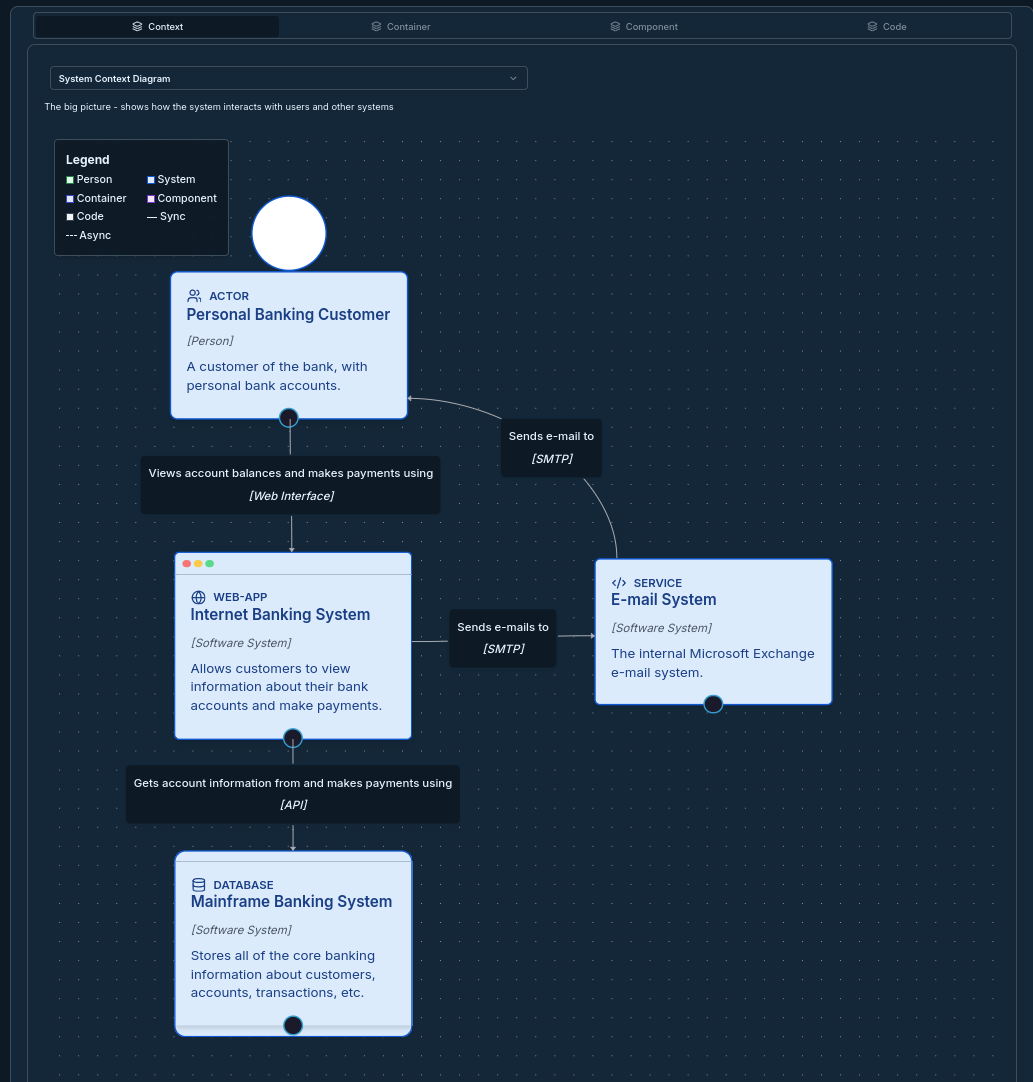
For a detailed walkthrough with real examples including a banking application, follow the C4 Model Tutorial.
C4 Model Tools
One of the C4 model's strengths is that it works with virtually any diagramming tool. However, some tools provide native support for C4 abstractions, which significantly reduces the friction of creating and maintaining diagrams.
The main categories of tools available today are:
Dedicated C4 tools like Visual C4 provide a purpose-built interface for C4 diagrams with built-in support for all four levels, automatic layout, and collaboration features. These tools enforce C4 conventions by design, which helps teams maintain consistency.
Diagrams-as-code tools like Structurizr DSL, PlantUML with the C4 extension, and Mermaid allow you to define C4 diagrams in plain text files that live in your repository. This is ideal for teams that want architecture documentation in version control.
General-purpose tools like Lucidchart, draw.io, Miro, and Figma can be used for C4 diagrams with custom shape libraries, though they require more discipline to maintain consistency.
For a full analysis of the available options including feature comparisons and pricing, see C4 Model Tools Comparison 2026.
Real-World C4 Examples
Understanding C4 in the abstract is one thing. Seeing how it applies to real systems — an e-commerce platform, a banking application, a microservices architecture — makes it click. Real-world examples also show common patterns like how to handle authentication flows, event-driven communication, and external API integrations in C4 notation.
Browse a curated collection of production-ready C4 diagrams across multiple industries and system types in Real-World C4 Examples. Each example includes all four levels and annotations explaining the architectural decisions behind them.
Architecture Decision Records and C4
The C4 model documents what your architecture looks like. Architecture Decision Records (ADRs) document why it looks that way. These two practices are complementary and together form a powerful foundation for architectural knowledge management.
An ADR captures the context, the decision made, and the consequences of a major architectural choice — for example, "why we chose a message queue over direct HTTP calls between these two services." When you link an ADR to the relevant Container or Component diagram, future developers can understand both the structure and the reasoning behind it in one place.
Many teams that adopt C4 find that it naturally prompts them to start writing ADRs as well, because the act of drawing a Container diagram often surfaces architectural decisions worth documenting. Learn how to combine both practices effectively in Architecture Decision Records.
Getting Started with Visual C4
If you have read this far, you understand why the C4 model is worth adopting. The next step is to actually draw your first diagram. Visual C4 is a purpose-built tool for creating, maintaining, and sharing C4 diagrams across your team.
Visual C4 gives you:
- A guided interface that walks you through all four C4 levels without requiring you to know the notation upfront
- Automatic layout so you can focus on the architecture rather than the aesthetics
- Real-time collaboration so your entire team can contribute to and review diagrams together
- Dark mode support and export options for presentations, wikis, and documentation sites
- A library of example diagrams to give you a head start on common system types
The fastest way to start is to open Visual C4, create a new workspace, and spend 15 minutes building your System Context diagram. Most users have a shareable, team-ready diagram within their first session.
Summary
The C4 model is the most practical approach to software architecture documentation available today. It solves the real problem that most teams face: their architecture lives in people's heads rather than in accessible, up-to-date documentation. By providing four clear zoom levels — Context, Container, Component, Code — and a vocabulary that non-technical stakeholders can understand, C4 makes architecture communication a first-class engineering practice.
Whether you are documenting an existing system for the first time, onboarding a new team member, or planning a major architectural change, the C4 model gives you a structured, lightweight way to think through and communicate your decisions.
Next steps:
- Read the C4 Model Levels Explained guide for a deeper dive into each diagram type
- Follow the C4 Model Tutorial to build your first diagram step by step
- Explore Real-World C4 Examples to see C4 applied to production systems
- Compare your options in C4 Model Tools Comparison 2026
- Start diagramming for free at Visual C4